Entradas

LESSON 7: COLLABORATION BY DIGITAL CHANNELS

Imagen
To start with, the main objectives of this lesson were: to be aware of the channels to connect with others and to collaborate by digital tools with the end of the interaction, to be able to use the technology and tools to work in a team, to create collaborative projects, and to create and to build common resources, knowledge, and contents, to know and to use collaborative tools such as forums and wikis, to take part in sharing public spaces and to control and to share teaching contents by software collaborative tools.  Digital collaboration refers to the use of digital tools with the aim of collaborating. The current digital tools and the Internet let a high number of people communicate in between them and share contents and work in the same way to get a shared goal. Also, the concept “online collaboration” is directly related to “digital collaboration”, whose meaning is similar, but the field of application that is only and exclusively the Internet. In terms of tools for digital c...
LESSON 6: CIVIC PARTICIPATION

Imagen
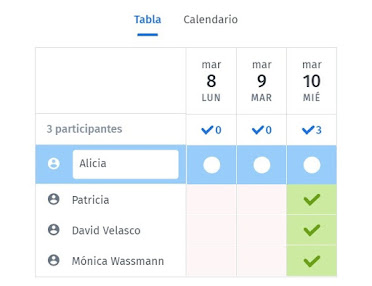
The main objectives of this lesson were: to know what civic participation is, to know how the information and communication technologies ease civic participation, to know the electronic services that Public Administrations offer to citizens, to know the technology can be used to participate in democratic actions, to be aware of the technologies and digital media potential as tools for civic participation and to understand how the technology can be used to interact with other services. In the first of the three practical tasks we had to make in relation with civic participation, consisted of creating a Doodle to decide the date of a meeting, and then the rest of the group had to answer that survey.  I created a survey in Doodle so that all people could participate in it and I could be able to organize the event or the meeting with the data obtained from the results. First, I created the survey and gave the participants the option to choose one of the three days that I set for a meet...

LESSON 5: SHARING INFORMATION AND DIGITAL CONTENTS

Imagen
In this lesson, we focused on how to share information and digital contents and how this will be useful for our future students. We had to do two activities, an individual and a group one. In the individual activity I created a mind map using Mindomo and an infographic about my group didactic unit explaining one concept related. And in the group one, all members of my group had to sing in a Genially account and create a presentation about our chosen topic, the peace day. For the first part of the individual activity, we had to create an infographic. They are very useful as they show information in a simple and visual way and also help with memorizing things as they stimulate photographic memory by being simple and are easy and fast to create. I chose a topic regarding my group topic unit and made this graphic visual representation with the objective of presenting information quickly, clearly and in a way that appears attractive and captures the attention to the user. In the image b...

LESSON 4: DIGITAL TECHNOLOGIES INTERACTION

Imagen
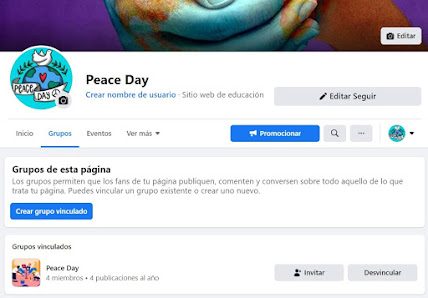
In this lesson we had to create a virtual learning community in a social network to talk to other teachers and professionals about the topic we had chosen. My group decided to create a community on Facebook about the peace day. Facebook is an online social networking website where people can create profiles, share information and answer to the information posted by others. We chose Facebook over other social networks because there is no limit of characters and because we can provide information for anyone that wants to know more about the peace day and other teachers can give us feedback regarding our didactic unit and suggest some new approaches. The main objectives of this activity were: to know those key competences to the student that let it to interact by a number of digital devices and applications, to understand how the digital communication is distributed, represented and managed, to understand the appropriate use of different communication ways through digital media, to study ...

LESSON 3: DIGITAL CONTENT, INFORMATION, EVALUATION AND LICENSING (SECOND POST)

Imagen
The objective of this activity was to practice with Creative Commons and create our own licences. We had to create two kinds of contents and share them in our blog. We had to add one image and one slide with a CC License. We also had to choose and add a licence to our blog. The image: As you can observe, this is an image that I took on January 2020 in the desert of Morocco. In the bottom left corner we can observe the creative common license for this image.  Since it is an original picture and not from the Internet, I've decided to use the license CC BY NC ND, which means that people can share this image as long as the work is recognized given the appropriate credit, it is not used for commercial purposes and the material is not modified. This work is licensed under the Creative Commons Recognition - Attribution-NonCommercial-NoDerivs 3.0 Unported. To view a copy of this license, visit https://creativecommons.org/licenses/by-nc-nd/3.0/ The presentation slide: This is the first s...

LESSON 3: DIGITAL CONTENT, INFORMATION, EVALUATION AND LICENSING (FIRST POST)

Imagen
In this lesson, we understood the concept of digital content which is any form of data or information in digital form (electronic files), as opposed to physical form. (Ex. documents, audios, images, videos, presentations). In addition, we learnt about software and its two main types. The system software: Operating system, file management utilities, disk operating systems, etc. and some examples are Windows, Android, iOS, defragmenting tool, etc. and the application software: Some examples are Word, Photoshop, Hot Potatoes, etc. There is a classification of the software in 4 types from the point of view of the license:  Traditional licence (Copyright): you pay for the privilege of using software. Free software: you have the freedom to modify the source code of this software and you can redistribute it. Freeware: this software is distributed free, but have copyright and you can’t change the source code. Shareware: initially distributed free of charge, but may later require a payment ...

LESSON 2: CLOUD DATA STORAGE AND RETRIEVAL

Imagen
During this first lesson, we learnt about the concept of Cloud Computing. It is a paradigm that makes it possible to offer computing services such as storage, content creation, blogs, etc. over a network, which is usually the Internet. Therefore, everything that a computer system can offer is offered as a service. Some features of cloud computing are: on demand service, you use it when you need it, network Access (Internet), shared resources, used by multiple clients and scalability, allows elasticity of resources. Cloud storage is a computer network-based data storage model, where data is hosted in virtualised storage spaces, usually provided by third parties such as Google Drive or OneDrive.  There are three types of cloud computing: public, private and hybrid. There are also different delivery models of cloud computing: SAAS which means Software as a Service, PAAS which means Platform as a service and finally IAAS, meaning Internet as a Service. Going in depth wich each delive...